
The rules for selling wall art prints have changed in the current Etsy landscape. More and more shops with AI-driven design processes are emerging as clear winners on Etsy. Before AI, the creation process was slow and manual, constrained by human limitations. But with AI tools now, you can turn any idea into an art piece with a click. You can now generate thousands of images and select the absolute best ones for your Etsy store. Now the focus is more on refining the generated art than on creating it. This is actually a good thing because you’re spending less time on creating and more time on perfecting, which is the secret sauce to achieving superior designs. But here’s the reality: while AI tools have been around for a while now, a massive knowledge gap still exists. And that’s exactly what we’re going to clear up in this guide. Below, we’ll dive into the complete roadmap on how to sell AI wall art prints on Etsy, including what Etsy’s AI policy allows, the best AI tools to use, and which products to create. We’ll also look at how to prompt, how to turn raw AI-generated images into a high-resolution, commercially viable print file, and which production methods are ideal.
What does the Etsy AI policy say?
Per Etsy’s creativity standards, Etsy allows AI creations provided they are based on the seller’s original prompts. It means buying prompt bundles and using them to create for Etsy isn’t allowed. Therefore, as long as you create your own original prompts, you can sell AI art on Etsy.
AI disclosure policy
Per Etsy’s creativity standards, ‘sellers must disclose within their listing description if an item is created with the use of AI.’ Therefore, you must include an AI disclosure in the description section. A common practice by Etsy sellers is to include this disclosure at the end of the description section.
Does AI wall art sell on Etsy?
This is a question many aspiring sellers ask online, proving that most people are completely missing the point here. In reality, buyers don’t view designs as AI-generated or non-AI; they view them as great or not so great. This means that as long as the wall art is creative, original, visually appealing, and human-vetted, it sells on Etsy, regardless of how the design was made. Plus, it’s a common myth that if you create anything with your hands, Etsy buyers will buy it. There are thousands of shops offering handmade art, but they don’t sell much. On the other hand, many Etsy sellers who openly use AI tools are hitting consistent sales. However, this does not in any way mean that buyers will buy any raw AI image that every other seller can generate. But they will definitely buy human-tweaked creative designs based on unique prompts. To be honest, wall art buyers are specifically more concerned with the creativity, overall vibe, color palettes, and how it looks on their wall than with who—or what—created the design. You can read more about it in the article Does AI Wall Art Sell on Etsy? — Research-Driven Insights.
1. Understand what’s driving people to buy
Before you create any wall art design, you need to understand who is actually buying and what they are looking for. If you create random designs purely for aesthetics, it will be difficult to make sales.
Who buys wall art on Etsy?
- Homeowners
- Gift Buyers
- Business Owners
What are they looking for?
Home Decor
Homeowners buy wall art for different spaces in their homes. Examples: wall art for the living room, kitchen, bathroom, bedroom, dining room, kids’ room, game room, coffee bar, home office, and reading room.
Identity Decor
Gift buyers and homeowners also buy wall art to express specific interests and professions. Examples: wall art for musicians, dads, moms, book lovers, coffee lovers, cat lovers, and teachers.
Decor for shops, cafes, and offices
Many business owners look for wall art to spruce up their workspace, whether it’s a cafe or a tech office. Examples: wall art for a coffee shop.
2. Dive into the Etsy wall art market
After knowing popular buying motives, the next move is to dive into Etsy to find current trends and low-competition products. Without proper research, you might end up launching products that get buried in the crowd, either due to low demand or intense competition. Here’s the thing: Wall art trends align closely with current home decor trends; therefore, it’s important to consider current interior design styles and themes to be successful as a wall art seller. You can read the article ‘I analyzed 500+ Etsy Bestsellers: These Wall Art Types are Selling Best in 2026‘ to understand what is currently selling on Etsy.
While spotting current trends is super important, it’s equally important to hunt down low-competition products. Old, established shops with a large product collection dominate generic keywords; you can’t as a new seller. For example, ‘bathroom print’ has thousands of competing listings, but ‘Japanese bathroom frog print’ has only hundreds. Rather than making a generic bathroom-themed print, focus on a specific type to bring down competition and boost your chances of ranking on the first page. Not to mention, you can always use Etsy’s research tools to hunt down high-potential, low-competition niches. Check out the article ‘20+ Etsy Research Tools Comparison (2026): A Comprehensive Research-Driven Analysis on Etsy Niche Finders‘ to learn about the best Etsy research tools available on the market, and the article ‘Etsy Product Research: How to Spot Winning Products and Avoid Common Mistakes‘ to learn how to hunt down promising wall art niches.
Best AI tool options
There are various AI image generators available on the market. However, there are two popular options that you should use for creating wall art:
Adobe Firefly
Basic plan costs $9.99. Included for free with other Adobe apps, such as Photoshop.
Pros:
- User-friendly
- Private generations
- Commercially safe
- Unlimited generations with the basic image generator (credits are used only for advanced generators)
- Free AI Upscaler
Cons:
- I’m hard-pressed to find any real cons here.
Midjourney
Basic plan costs $10.
Pros:
- Stunning artistic visuals
Cons:
- Learning curve
- No private generations without a $60 plan
- No commercial safety assurance
- Limited generation time with the basic plan
3. Create art with high-quality prompts
Many people still believe that AI art looks obvious and generic. But that’s a thing of the past, thanks to advanced models that can create artwork that looks like it was made by a pro. For example, while earlier Adobe Firefly models used to create obvious, AI-looking art, the latest model 5 creates illustrations where it’s tough to tell if they’re even AI. Another reason for that generic ‘AI look’ is the use of vague prompts that lack detail. If you look at many successful Etsy shops selling AI art, you’ll notice that their designs don’t look AI at all, but rather like high-end masterpieces. This is because they know how to prompt and which models to use.
Shoppers buy wall art to enhance their home decor. While prompting, you should think both like an artist and an interior designer. If you use generic prompts, your designs will look similar to those of thousands of other sellers. You can make your art stand out right from the start just by getting specific with your prompts. You can check out my full guide ‘How to Make and Sell Wall Art on Etsy with AI? — A Research-Driven Guide with a Real-Life Example‘ to learn more about mastering prompts.
4. Fix AI flaws
AI-generated art might’ve some mistakes, such as flawed hands and text. You can easily clean them up with AI tools using simple prompts. But thankfully, these glitches are getting less frequent with the latest AI models. For example, Firefly Image Model 5 rarely makes those annoying mistakes, unlike the older Model 4.
5. Upscale the generated art
The AI-generated images do not meet print standards. They are 72 PPI and have smaller dimensions. But wall art prints require design files at a much higher resolution of 300 PPI. Just a heads-up: simply resizing an AI image on a 300 PPI canvas won’t work, as it’ll end up looking blurry—which means angry customer complaints and returns. That’s why you’ll need an AI tool to upscale the image size and resolution for high-quality, crisp prints. For a full step-by-step upscaling process, read our dedicated post, ‘How to Upscale AI Art to 24 x 36 Inches With an AI Upscaler Without Losing Quality (for Online Print Sellers).’
6. Polish up your AI art
Raw AI-generated images typically look flat. That’s why you’ll need to tweak the brightness, contrast, and colors to make the art look high-end. You can easily do this in Photoshop or Lightroom.
Should you sell digital or physical prints?
If you’re on a tight budget, digital downloads look like a dream—no physical deliveries, no return hassles, and pure profit. But don’t write off physical prints just yet. Let’s compare both options and see which one wins. First, let’s break this common myth—selling physical prints needs a huge budget. Despite what most people think, elling physical prints doesn’t have to cost you a dime upfront if you partner with a print-on-demand supplier. Becuase the POD company prints and ships each item only after a customer buys it, you don’t have to carry any inventory at all. Plus, linking the service straight to your Etsy shop takes just a few clicks.
But if we look at selling digital downloads, though it sounds like an easy business, the reality is that this market has become overly crowded. Tons of established Etsy shops are now dumping massive ‘whole-shop’ bundles comprising thousands of digital prints created over the years. Because of that, it is becoming more and more difficult for a new store to get sales. Plus, digital prints have low perceived value, so you can only charge around $3- $5 per design. On top of that, they come with a lot more customer messages asking for technical help with the files. On the flip side, buyers value physical prints more, so you can charge enough to get a fat profit. What’s more, you don’t have to deal with a bunch of annoying post-sales technical questions.
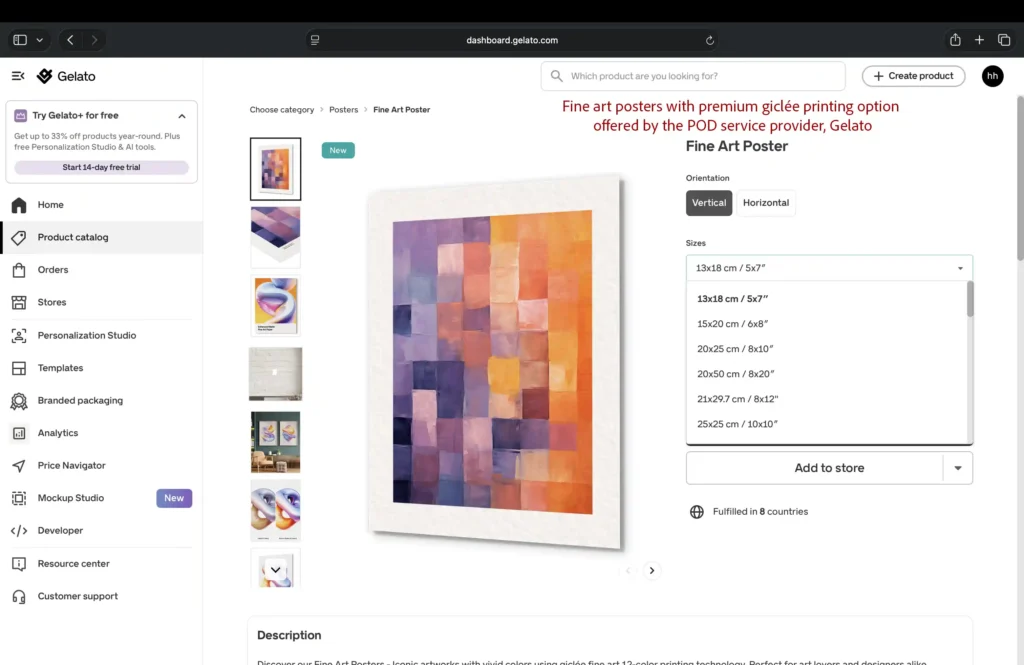
Major POD companies for wall art: Gelato, Artelo, Printify, and Printful.
As you can see in this screenshot, Gelato (a popular print-on-demand supplier) lets you offer premium giclée printing for your fine art posters.
6. Order test prints
Before you commit to any POD partner, always order a sample of your own work to check out the print and paper quality first. A print provider might have a good overall rating but may be experiencing recent quality issues. That’s why you never pick a print supplier just because they have five stars online; test it out yourself to save your shop from angry customers and bad reviews down the road.
Insider tip: Start with unframed prints first
Unframed prints are actually more popular than framed prints. Why? Because most buyers prefer their own frames to match their decor. They want a very specific frame material, color, and thickness. That’s why you should always start with unframed prints. Not to mention, you can always add framed options later, once your designs start getting consistent sales.
7. Prepare popular sizes
Wall art isn’t a one-size-fits-all kind of business-buyers have totally different wall spaces to fill. While print suppliers offer tons of sizes, you should stick to the most popular so you don’t overwhelm your buyers. Which sizes are the most popular? It really depends on whether you’re selling physical prints or digital downloads. If you’re selling physical prints, here’s a key detail most beginners miss: the popular sizes depend on the region you are serving. For example, if you are selling in the US, standard sizes like 8×10, 11×14, and 16×20 are safe bets because frames for them are incredibly easy to find. On the flip side, if you’re selling digital prints, you only need to provide 5 or 6 high-resolution aspect ratios at their maximum sizes to cover every framing option imaginable. Check out my ultimate guide to the most popular print sizes on Etsy to see exactly which dimensions sell best for physical vs. digital products.
How to size art prints?
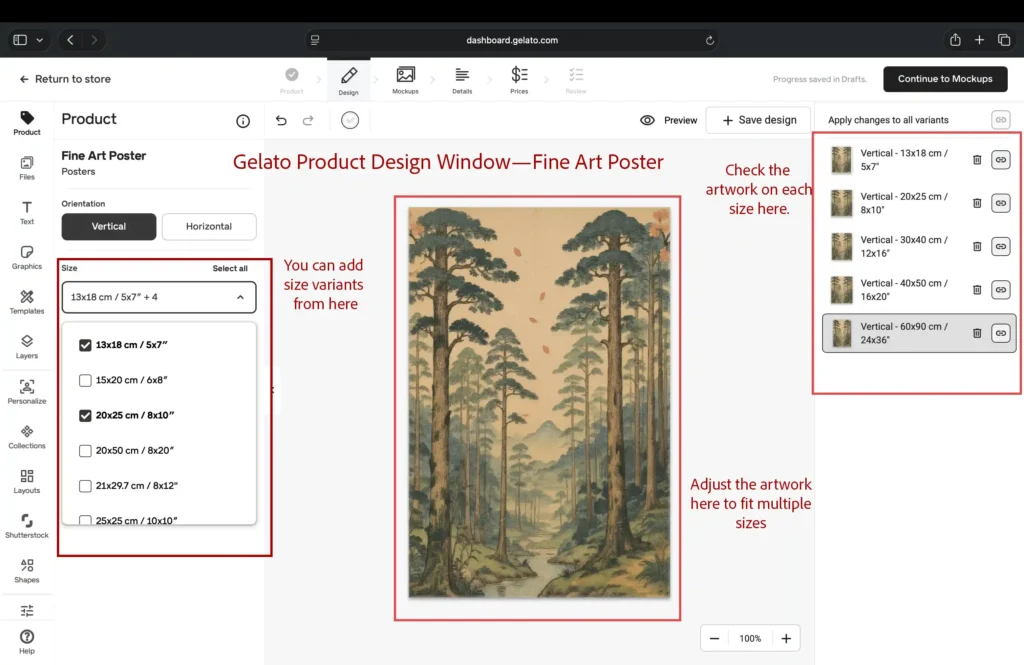
The way you size your art prints depends entirely on whether you are you’re selling physical prints or digital downloads. When selling physical prints through a POD supplier, the trick is to upload your maximum-size design to their dashboard. From there, pick the bestselling sizes, and simply crop or scale the artwork to fit those dimensions without losing quality.
In the screenshot below, you can see Gelato’s product design window. This is where you can easily add sizes, adjust your artwork, and preview how it looks in every single dimension.
Pro tip: Make sure your artwork looks consistent across all sizes
You cannot adjust the artwork individually for each size on the dashboard of any POD website. Adjusting your design on one size globally changes it for all of them. Because you can’t edit them independently, the edges of your art will get cropped differently depending on the dimensions. So, just make sure your artwork doesn’t look totally different from one size to the next. Keeping things consistent is the easiest way to skip customer complaints altogether.
So, how do you keep things looking consistent? You’ve got two great options here. First, you can scale your artwork slightly smaller than the canvas to create a clean white border around the edges. Or, if you’re dead set on a full-bleed look, you can use AI to expand your background and add a little extra cushion around the edges so nothing important gets cut off.
8. Prepare Listing Photos with Mockups
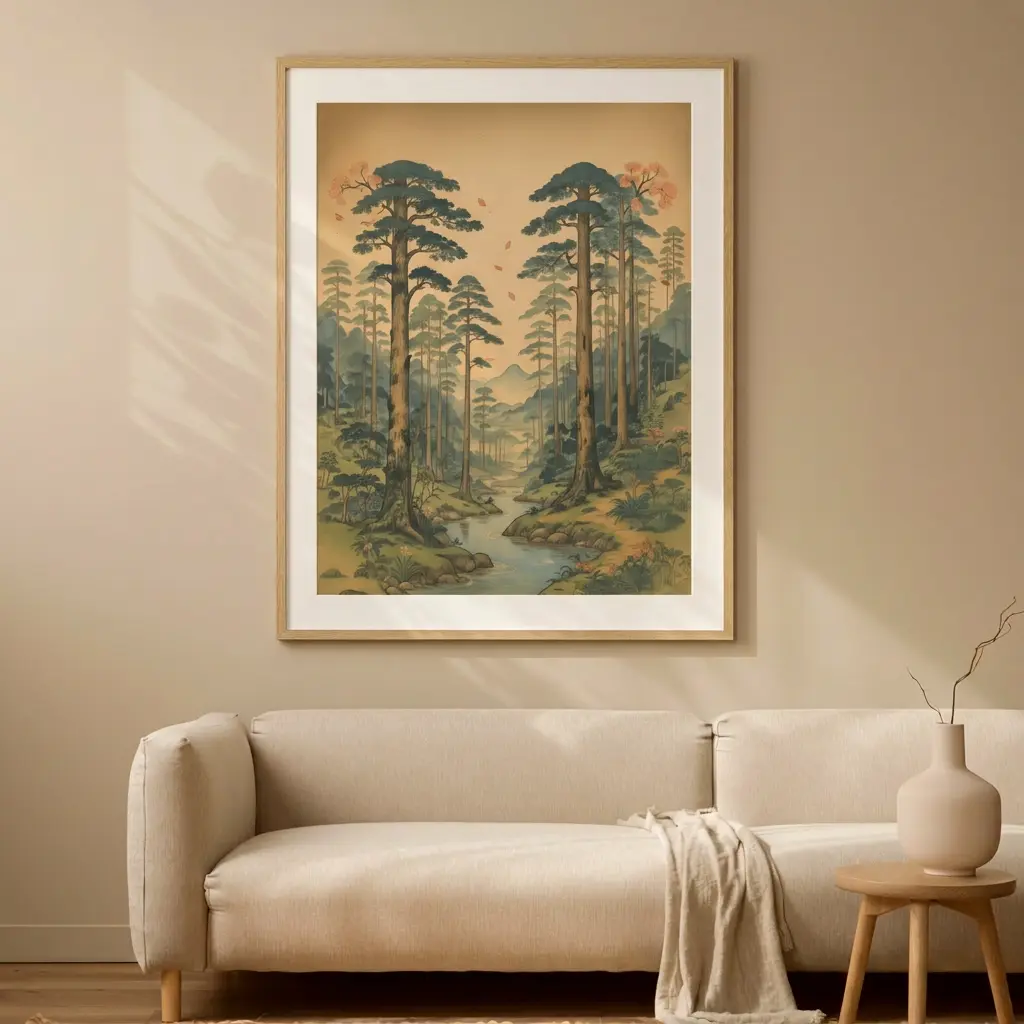
You don’t need to physically print each art print design and take photos of it; doing so will eat up your profit margins. You can prepare listing photos 100% digitally with mockups. Basically, mockups are curated digital scenes designed to display your framed art in a real room setting. You can either grab pre-made mockups from online marketplaces and drop your digital design onto the blank frame, or use an AI tool to generate your own custom scenes from scratch. Adobe Firefly is a total game-changer when it comes to making top-tier wall art mockups. You just need to upload your design and prompt the AI tool to convert it into framed wall art in a clearly defined scene. Check out my guide on creating stunning wall art mockups with Adobe Firefly to learn the secret to making perfect listing photos that actually sell.
Here’s a quick look at a framed wall art mockup I created with Adobe Firefly to show you exactly what’s possible.
9. Set up your Etsy listings to get found (titles & tags)
If you’re using a short, generic title for your wall art listings, it probably won’t get found in search. Instead, notice how many successful Etsy sellers pack their titles with multiple low-competition keywords—this helps them rank in as many relevant searches as possible. When it comes to tags, it works the same way. Keep in mind, big sellers dominate generic tags; you can’t, as a new seller. That’s why you need to initially add low-competition keywords to get found easily. Once your listing starts to gain traction and initial sales, you can bring in high-volume, competitive keywords to scoop up way more buyers.
Here’s another important thing: While there is no guarantee that Google will index your listing page, it’s no secret that it doesn’t take thin-content pages seriously; that’s why if you’re really serious about organic traffic, you should aim for a 200- to 400-word product description to up the chances of getting your product page in Google search results.
The importance of long-tail keywords for your Etsy wall art store
Long-tail keywords are 3+ word search phrases that shoppers use to find a specific product they are interested in. They’re incredibly valuable because they show that the shopper is actually ready to buy. For example, a shopper searching for ‘wall art’ may be browsing, whereas the one searching for ’emerald green art print’ is definitely looking to buy a specific product. Plus, these long-tail keywords are less competitive; for example, there are millions of listings out there using the phrase ‘wall art,’ but only a few thousand using ’emerald green art print.’ That’s why including long-tail keywords in your title, description, and tags is a must if you want motivated buyers to land right on your product page.
10. Disclose Production Partner
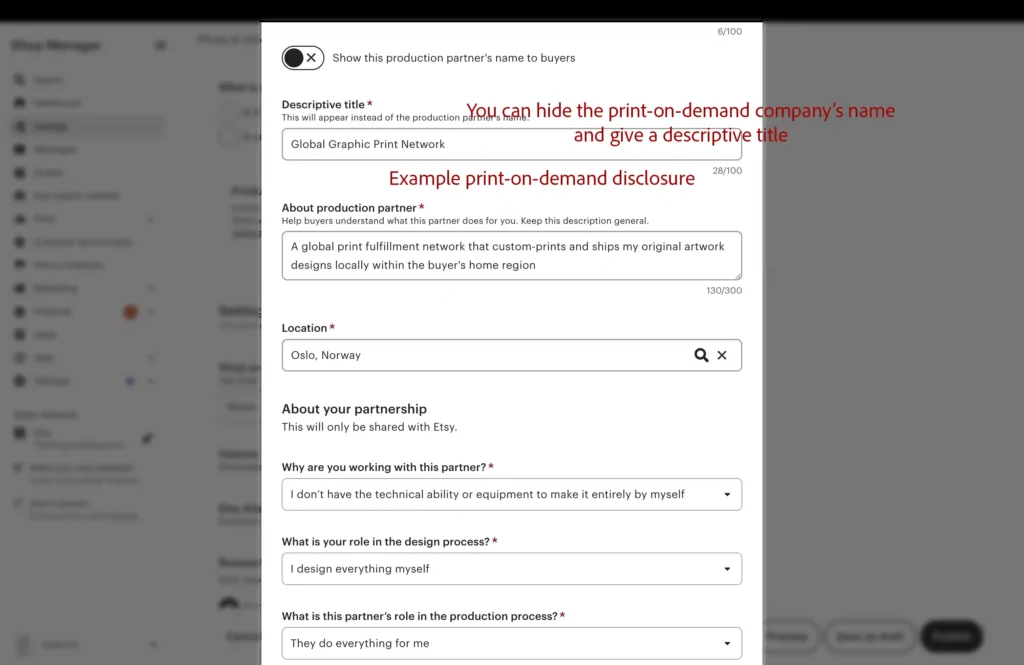
Just keep in mind that under Etsy’s creativity standards, if you use a print-on-demand supplier, you have to disclose it in your shop. Here’s a quick look at exactly what the production partner disclosure looks like when you’re setting up your Etsy shop. The best part is that Etsy lets you hide the production partner’s name and use the descriptive title instead. You can absolutely use this feature to keep your backend business details totally private.
A few other important things to take care of
Setting your returns and refunds policy
Keep in mind that most print-on-demand companies won’t give refunds just because a buyer changed their mind, picked the wrong size, or decided they didn’t like the color. That said, if the supplier mixes up the size or quantity, or if the item shows up damaged or gets lost in the mail, they’ll gladly provide a free replacement or a refund. The easiest move is to simply copy your print-on-demand supplier’s return policy for your own shop. Doing this completely saves you from losing money on returns that the POD company refuses to take back.
Getting Sales as a new seller
If your wall art store is brand new and hasn’t gotten any reviews yet, landing those first few sales can feel like a bit of an uphill battle. You’re not facing a unique problem here; this is the phase every store on Etsy has gone through. But don’t worry—there are a few great strategies you can use to get past this slow start and build up momentum. You can check out our article on how to get sales on Etsy without any reviews to learn how to score your first few sales from scratch.
Keep a consistent brand vibe
As a new seller, it can be tempting to experiment with different styles, colors, and mockups— but it can make your store look a bit generic rather than curated. And that’s exactly why sticking to a specific design style (e.g., minimalist, maximalist, retro), a similar color palette, and a consistent mockup look is a smart move when starting out. Remember, keeping your look consistent elevates your store to a curated brand.
Staying Clear of Copyright and Trademark Traps
You might be passionate about a famous brand, catchphrase, logo, character, or film and want to put it in your designs. But doing this is incredibly risky and can easily get your store banned overnight. If you are making text-based art prints, make it a habit to run your phrases through the official U.S. Trademark website to check that you are not accidentally stepping on any trademarks. And keep an eye out for viral memes, too—even if they aren’t officially trademarked yet, they can still cause legal headaches.