

Many new Etsy wall art sellers struggle to get sales. I know this because I had been in the same position. The biggest mistake new sellers make is comparing their listing photos to those of old, established shops with strong sales numbers and thousands of reviews. Old, established shops dominate buyer trust and visibility; you can’t. You really have to up your game when it comes to listing photos so buyers are compelled to click on your listings over those of trusted shops. If you are using low-quality mockups, you will not be able to compete in a crowded market. Before AI, creating high-quality Etsy listing photos was a challenge. However, with AI, the process has become much easier. Many new Etsy sellers are not using AI at all and rely on low-quality, overused mockups. Some who do use lack proper knowledge about the proper creation process and commercial safety. Therefore, I have written this guide to creating high-converting Etsy wall art listing photos using the right AI model. This guide is based on my real-life experience with AI models, including thousands of image generations.
Which AI Platform to Use?
There are many AI platforms that you can use to create listing photos. However, only one AI model offers commercial safety assurance: Adobe Firefly. You can also use free Gemini (Nano Banana) and ChatGPT image generation, but they lack commercial safety assurance, offer fewer specifications and editing features, and produce generic images. Furthermore, within Adobe Firefly, you have the entire ecosystem, from production to editing, as opposed to other models that only offer stand-alone image generation. Furthermore, from a data privacy perspective, Adobe Firefly is safer because it does not train on your data, unlike ChatGPT and Gemini.
Creation Process with a Real-Life Example
Create a Specific Prompt
Generic prompts lead to generic images. You should differentiate your listing photo at the prompt level itself. You should include all specific details you need in your Etsy wall art listing photos, such as:
- Type of space: bedroom, living room, dining room, bathroom.
- Interior type: minimalist, luxury, boho, Japandi, dopamine decor
- Wall color
- Frame type: wood, metal
- Frame size: small, medium, large
- Overall environment: warm, cool, shadows
Select the Ideal Aspect Ratio
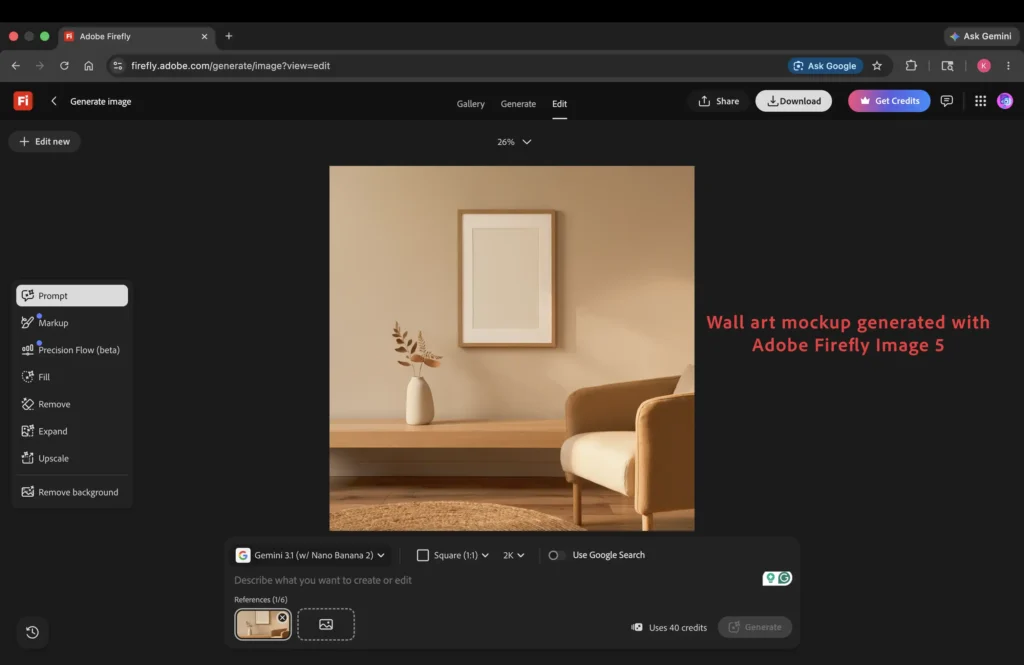
There are various acceptable aspect ratios for listing photos on Etsy. However, the ideal one is square (1:1) because it works best in both phone and desktop views. Adobe Firefly lets you set the preferred aspect ratio for image generations. You should select the square (1:1) option before generating an image in Adobe Firefly.
Which Adobe Firefly Model to Use?
You should always use Adobe Firefly Image 5, the latest AI model. It can be tempting to use the Image 4 model, as it offers unlimited generations, but the generated images often exhibit typical AI imperfections, whereas Image 5 generates flawless images.
In the screenshot below, I have generated an empty wall art mockup in an aesthetic, minimalist living room at a square (1:1) aspect ratio using the Adobe Firefly Image 5 model.
Add Your Art to the Mockup with a Prompt
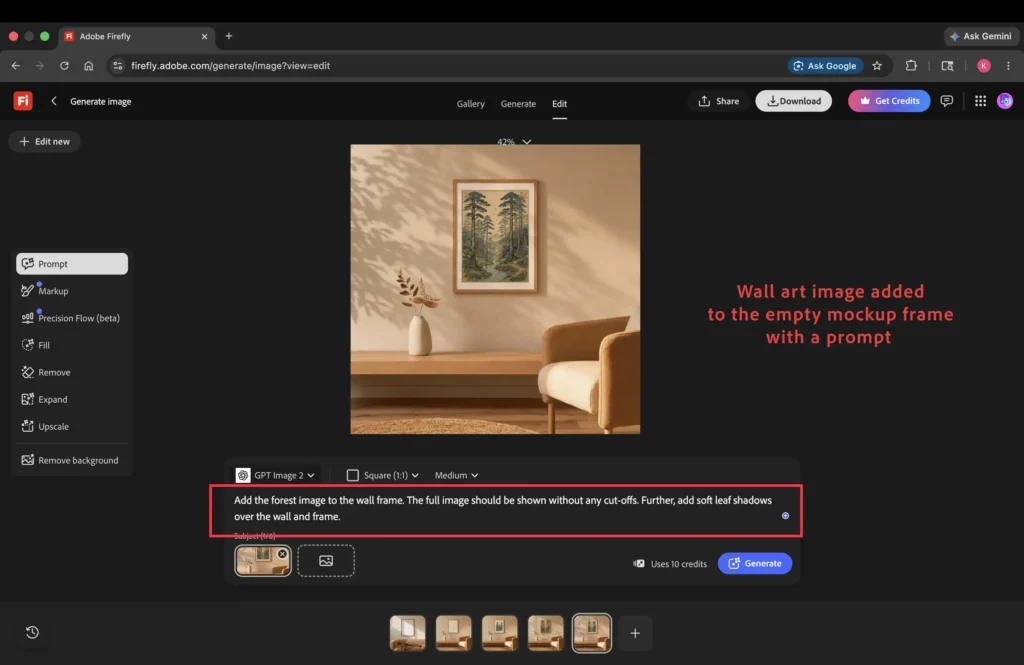
You can add your wall art to the empty frame with a prompt. Various third-party models, such as ChatGPT and Gemini, are integrated into Adobe Firefly. These third-party models are better at adding images to empty mockups than Adobe’s own models. They allow you to add up to 6 reference images. You can add the generated mockup and your wall art image, then prompt the model to place the image in the empty wall art frame. The AI model will automatically determine what goes where.
In the screenshot below, I have added my wall art image to the empty wall art frame with a simple prompt using the GPT Image 2 Model. With the same prompt, I have also added subtle shadows on the wall to make the generated image look like a product of high-end photography.
Generate Different Views with Prompts
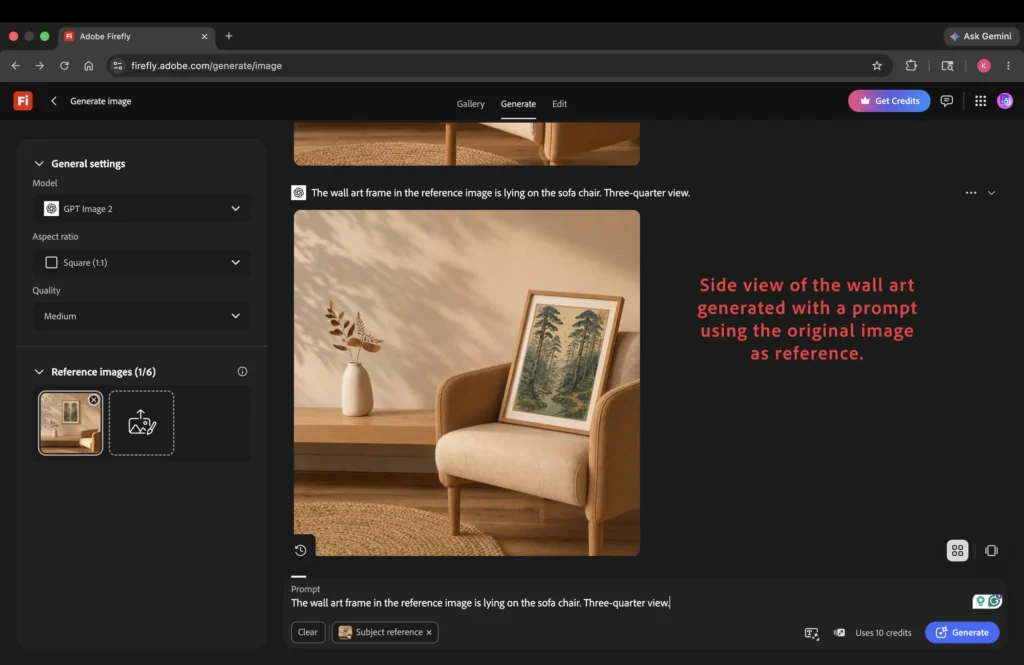
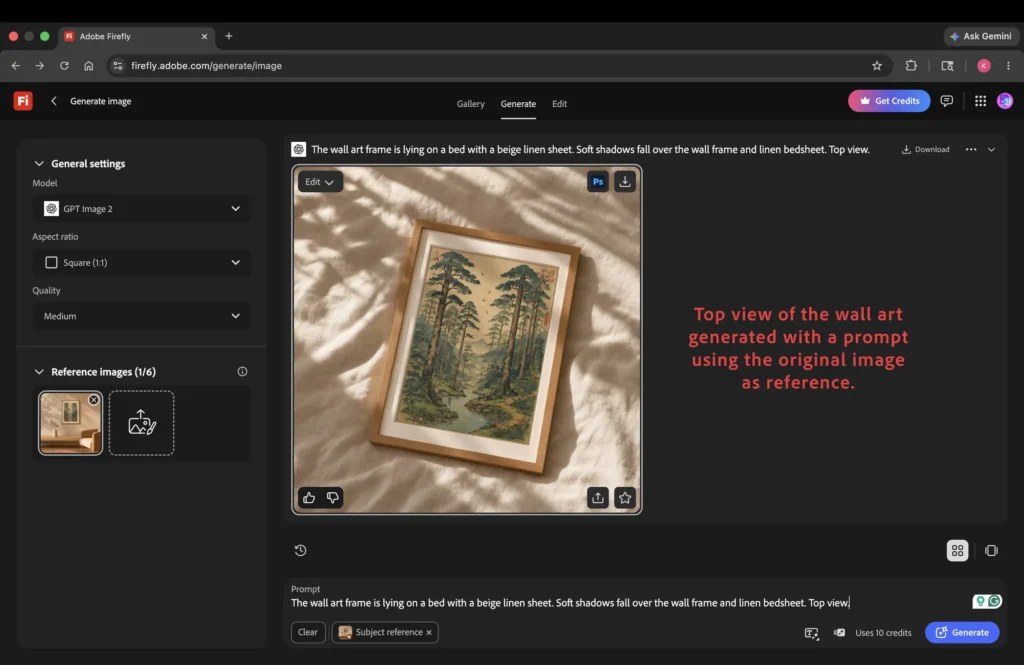
The best part of using AI for listing photos is that you can generate different views of wall art from the original image. This creates a cohesive collection of listing photos rather than separate photos with entirely different scenes. Consistent listing photos with the same photography style and color palette convey strong branding, which attracts Etsy shoppers.
In the screenshot below, I have generated the side view of the wall art frame lying on the same sofa as in the original picture with a simple prompt in Adobe Firefly.
Similarly, I generated the top view of the wall art with a simple prompt using the original image as the reference to maintain a consistent photography style and color palette.
After you are done generating listing photos in Adobe Firefly, you can download them and list them in your Etsy shop.
You can read the article ‘How to Sell Wall Art Prints on Etsy: The Complete Blueprint from AI Design to POD Sales‘ to learn about each aspect of selling wall art prints on Etsy, from the AI design process to the ideal production method.