
Let’s be real, the Etsy wall art game has totally shifted. AI models have gotten so advanced that telling the difference between a human-made piece and an AI generation is practically impossible these days. More and more shops are riding the AI wave and actually pulling in consistent sales. Earlier, a new seller had to create everything from scratch, leaving less time to experiment with different styles to compete with big sellers. Now imagine you can create hundreds of variations for the same concept with a click, cherry-pick the absolute best ones, and then experiment with different textures and color palettes until you land on an absolute masterpiece. This is exactly what you can do with an AI tool. But here’s the thing: many people still don’t understand AI art creation. I’ve generated thousands of images with AI models and know what it takes to create perfect AI art. That’s why I’ve written this guide on how to make nursery wall art to sell on Etsy to save you years of learning that I had to go through.
Why Adobe Firefly?
First, Adobe Firefly offers commercial safety assurance that other image generators don’t. If you don’t know, online selling has this big headache of copyright and trademark strikes. Getting a tool that offers protection against this is a big relief. Plus, if you subscribe to Adobe apps like Photoshop and Illustrator, you get free access to Firefly. Plus, Firefly even lets you tap into other advanced models like Gemini, making it super easy to tweak your edits and nail a consistent art style. So you are not just getting a stand-alone image generator but a complete professional-grade image creation and editing package plus upscaling tools, which you totally need when you’re selling AI art.
What actually sells best in nursery wall art
This is the question every aspiring seller must ask before jumping in to create any random design. If you are making designs out of your imagination without checking what people actually want to buy, your shop can easily turn into a zero-sale disappointment. That’s why you need to do a little homework first, so you actually know what you’re getting into. The good news is that I’ve already done this heavy lifting for you. Check out my guide on how to make and sell nursery wall art to spot the bestsellers.
How to make nursery wall art with Adobe Firefly that sells?
Here’s the golden rule of any AI tool: garbage in, generic out. If you feed it lazy, generic prompts, you’re just gonna get basic, cookie-cutter results. High-quality outputs take actual thought. Think of it like directing a movie. If you just tell the AI to “draw a cute bear,” you’re leaving it to guess. But if you tell it to render a fluffy watercolor brown bear wearing a tiny yellow raincoat, splashing in a rainy puddle with a soft pastel color palette, you’re actually getting what’s in your head. Let’s understand this with a few examples:
A few examples…
Animal-based designs
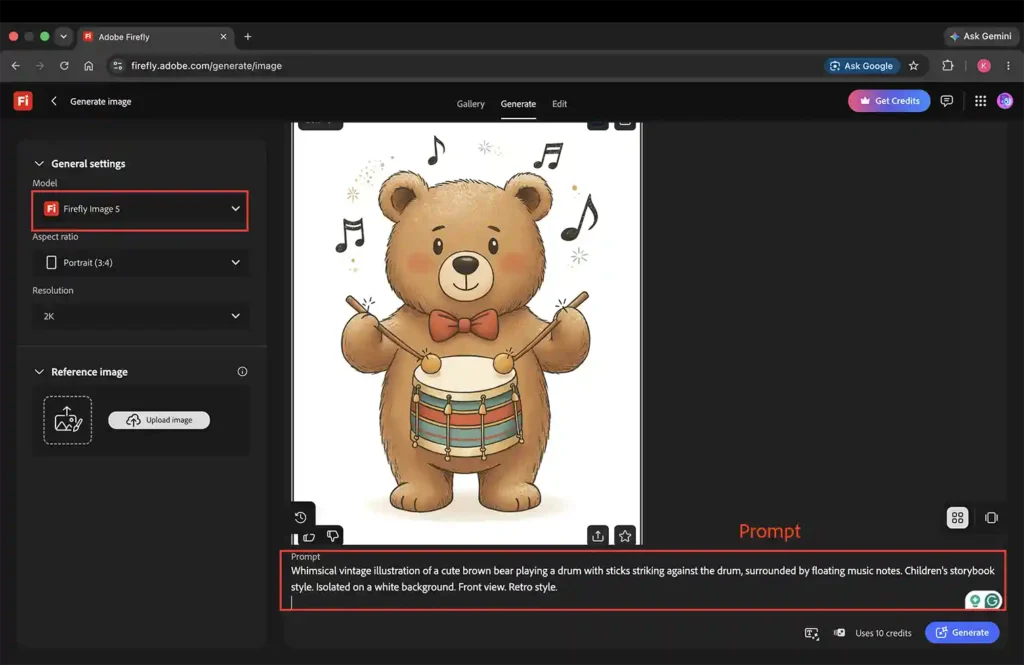
Cute animal-based designs are a big hit among nursery wall art buyers. Check out this screenshot of a cute bear playing a drum that I whipped up using the Adobe Firefly Image 5 model. To get this look, I spelled out all the important details in the prompt: a brown bear, the action of playing a drum, a vintage retro art style, a straight-on front view, and a clean white background with floating music notes.
Generate cohesive sets using the reference image feature
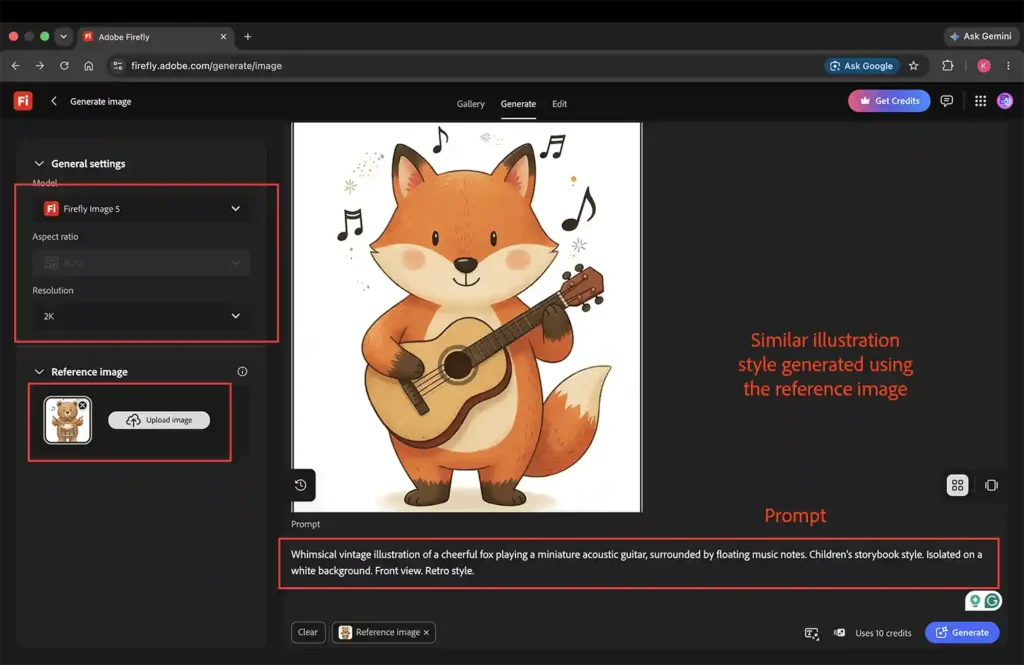
Once you get your ideal image, you can use it as a reference to generate similar styles and create cohesive sets of 3, 4, and 6. Just upload that image straight into the reference section, like you see in the screenshot below. Parents love gallery wall art to fill up big empty wall spaces. If you are only selling single, stand-alone prints, they may not sell.
Here’s a screenshot showing a matching style to the bear one above, generated using the ‘reference image’ feature.
One more example
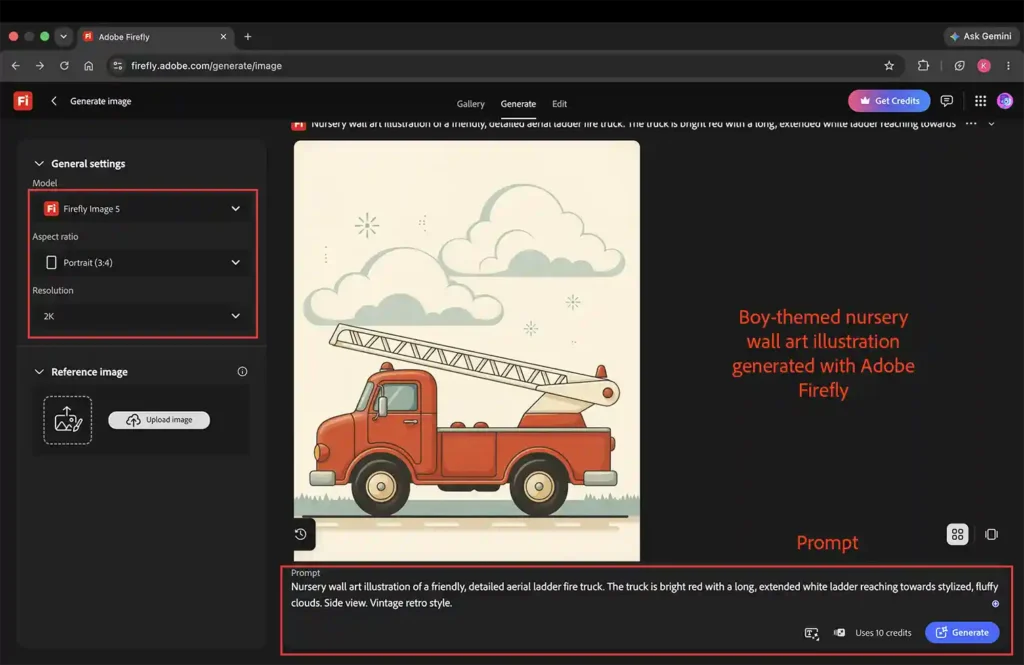
Here’s another example featuring a boy-themed firetruck nursery illustration. Take a look at how specific the prompt needs to be to get a high-end, polished illustration and avoid that generic, cookie-cutter AI look.
Pro tip: Always generate in 2K resolution
Firefly model 5 is set to 1K resolution by default, but you should always change it to 2K resolution. This is because you have to upscale the generated image to make it print-ready, and getting the base image at the largest possible size is the secret sauce to get to a high-quality upscaled version.
What’s next?
You can’t simply sell a raw AI image directly on Etsy. You need to do further tweaks, like refining the colors, brightness, and contrast, which can be easily done in Photoshop. Plus, raw AI images aren’t print-ready out of the box. You need to run them through an AI upscaler to upgrade the resolution to print standards. If you want the full breakdown on how to do that without losing quality, check out my guide on how to upscale AI art.