
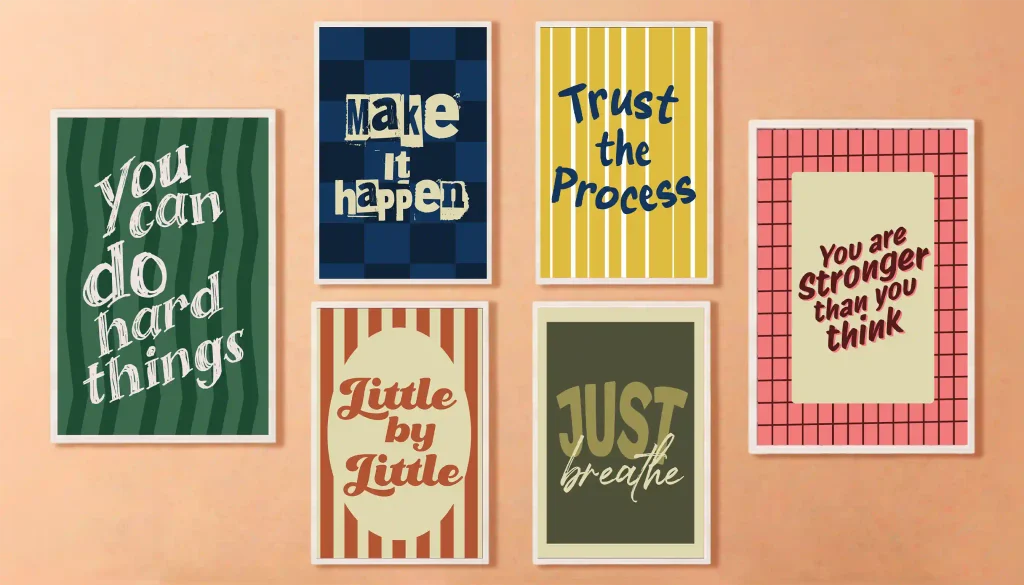
Typography wall art is HUGE on Etsy, and it has so many cool sub-niches. One of the absolute bestsellers in this space is retro-style motivational prints. People are buying them like crazy for therapy offices, classrooms, home workspaces, and even kids’ bedrooms. Plus, they make awesome gifts. But here’s the thing: a lot of new Etsy sellers get stuck right at the beginning; they just don’t know where to start or which design tools are actually worth using. That’s why I put together this guide based on real Etsy bestsellers, so you can kick things off the right way.
The design tool for this tutorial
I used Kittl for this tutorial because it absolutely shines when it comes to typography and has an incredible font library. Plus, it’s crazy beginner-friendly with a simple drag-and-drop editor; perfect if you’re looking to speed up your workflow and get selling on Etsy fast.
What’s actually selling right now?
For a long time, clean minimalism completely dominated the wall art scene. But now, buyers are getting a little tired of plain and simple. That’s why there’s a massive shift toward bold, retro-inspired art packed with vibrant colors, cool handwritten fonts, and fun striped or checkered backgrounds. Plus, the “dopamine decor” trend- using vibrant, happy colors to boost your mood- is exploding in interior design right now.
How to design retro text art that sells
1. Pick a bestselling background trend
After digging into over 100 Etsy bestsellers, I noticed a clear trend. The top-performing backgrounds for retro text wall art usually fall into three main styles:
- Classic Stripes: Vertical or wavy candy stripes that give off instant vintage vibes.
- Checkered Patterns: Bold, two-tone grid patterns that make high-contrast text pop.
- Solid Backdrops: Plain background colors, ranging from warm neutrals to bold shades, that keep all the focus on your typography.
2. Pick colors buyers are actually loving
Wall art color trends do shift over time. That’s why it’s important to keep an eye on what colors are currently in-trend for wall art. The good news is that I’ve done this heavy lifting for you. Check out our guide on the top wall art color trends for 2026 to know which colors are dominating this year.
3. Spot bestselling quotes
Don’t guess what people want to read on their walls; look at what’s already selling. Trending quotes usually fall into three major buckets: minimal daily affirmations, cheeky micro-humor, or timeless classic lines (e.g., “You Can Do Hard Things” or “Trust the Process”). Scroll through Etsy bestsellers to hunt for classic phrases that already have proven demand, which you can use as-is or remix with your own spin. But don’t be afraid to write your own completely original quotes, too! If you spot a trend, like cozy home vibes or funny workplace humor, authoring your own unique lines lets you own a micro-niche that nobody else is competing in.
The #1 safety rule: the legal stuff
Here’s a major trap to avoid: don’t blindly trust what other Etsy sellers are doing. A lot of shops print phrases that aren’t actually legally clear, putting their store at risk of getting shut down without warning. Just because you see a quote everywhere doesn’t mean the owner cleared it; always do your own quick sanity check first.
Real-world warning sign
Don’t assume an Etsy bestseller is safe to copy. Quotes like “Everything Is Figureoutable” pop up everywhere, but that phrase is tied directly to author Marie Forleo’s personal brand and book title. Using famous registered phrases might get you a few fast sales, but it can easily lead to listing takedowns or permanent shop bans.
How to keep your shop 100% safe:
- Steer clear of risky sources: Skip famous movie lines, brand slogans, and pop-culture catchphrases before you waste hours on a layout.
- Use AI for a fast sanity check: If you’re on the fence about a quote, ask a free AI tool if it’s tied to a known brand or public figure.
- Search the USPTO database: Head to the official USPTO trademark site, and look up your phrase. Check specifically for terms like posters, art prints, or art pictures under International Class (IC) 016.
If you see those goods listed under an active mark, ditch the phrase immediately; pivot to an alternative, or better yet, write your own original quote!
4. Create a Kittl file
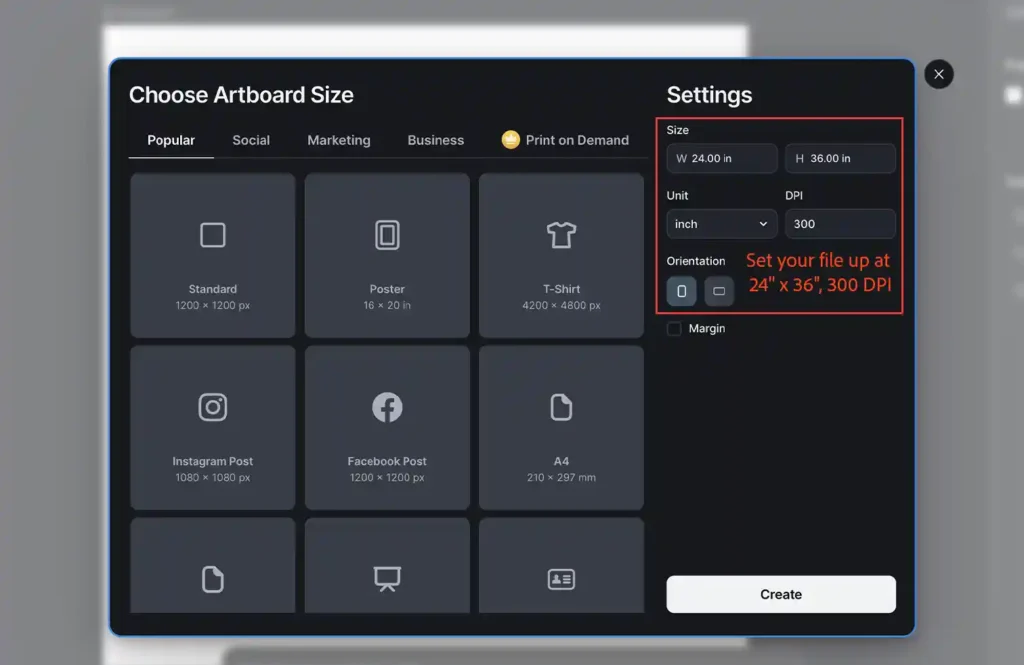
Head over to Kittl, click Create in the left sidebar, and set up a 24” x 36” artboard at 300 DPI. We’re starting with 24×36 because it’s the most requested size for large wall art.
Pro Tips:
- Always design at the largest size first: Scaling down to smaller sizes maintains crisp vector and raster quality, but scaling up stretches your pixels and makes everything blurry.
- Keep DPI locked at 300: This is non-negotiable for print-on-demand if you want sharp, professional print results.
5. Create your designs
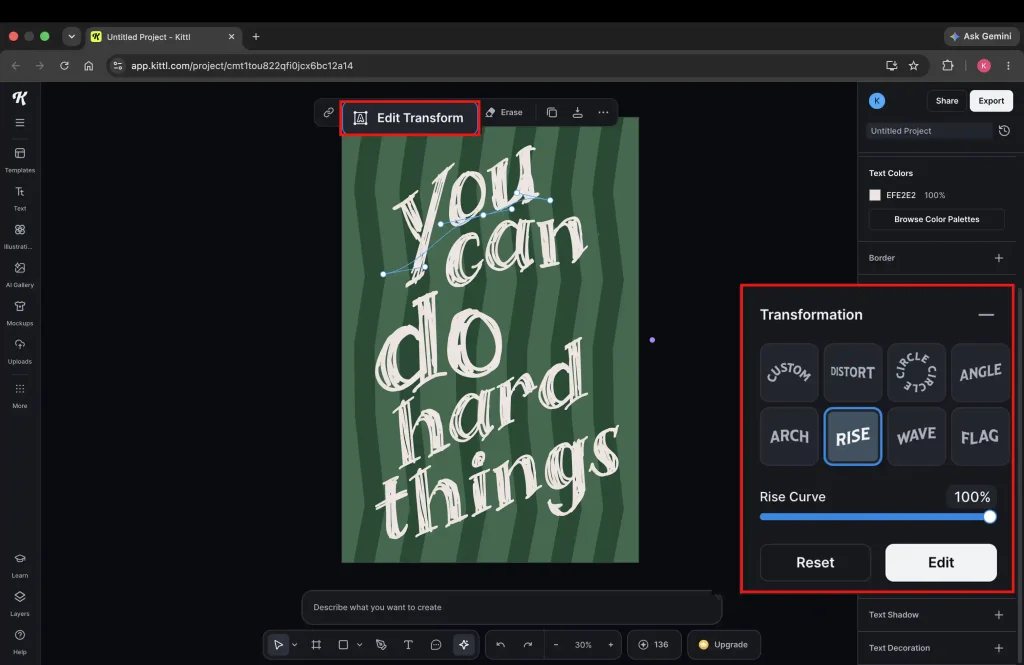
Design 1 (Wavy background)
Font name and color: Atalon, Off-white (#EFE2E2)
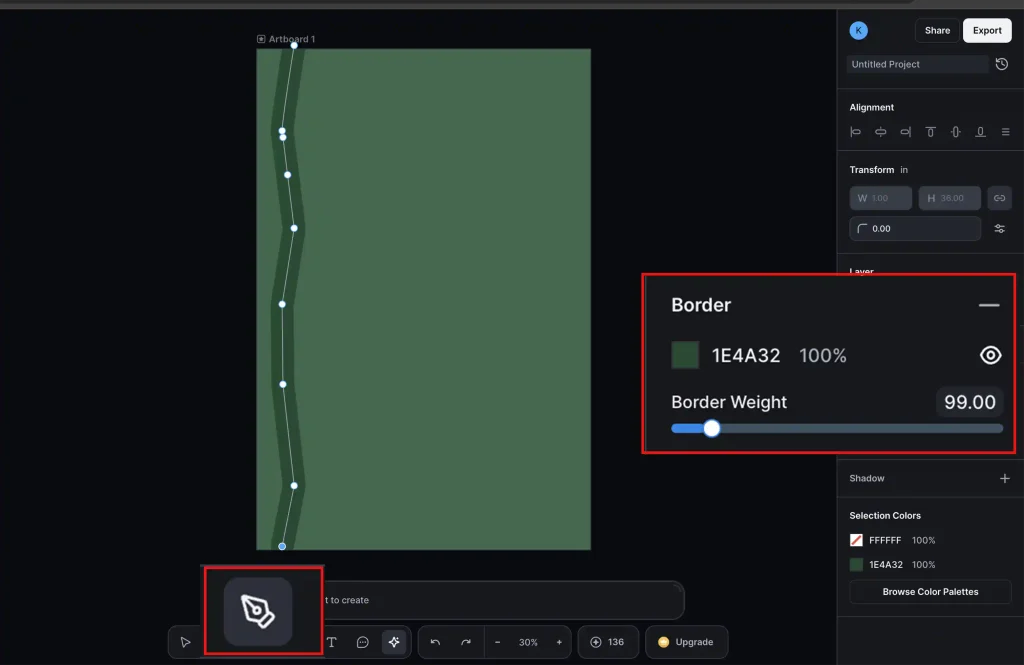
Background color palette: Deep emerald green (#3B694C), Dark forest green (#1E4A32)
A. Add the background color. Use the pen tool to add a zig-zag line and increase its border weight. Duplicate until the pattern covers the background.
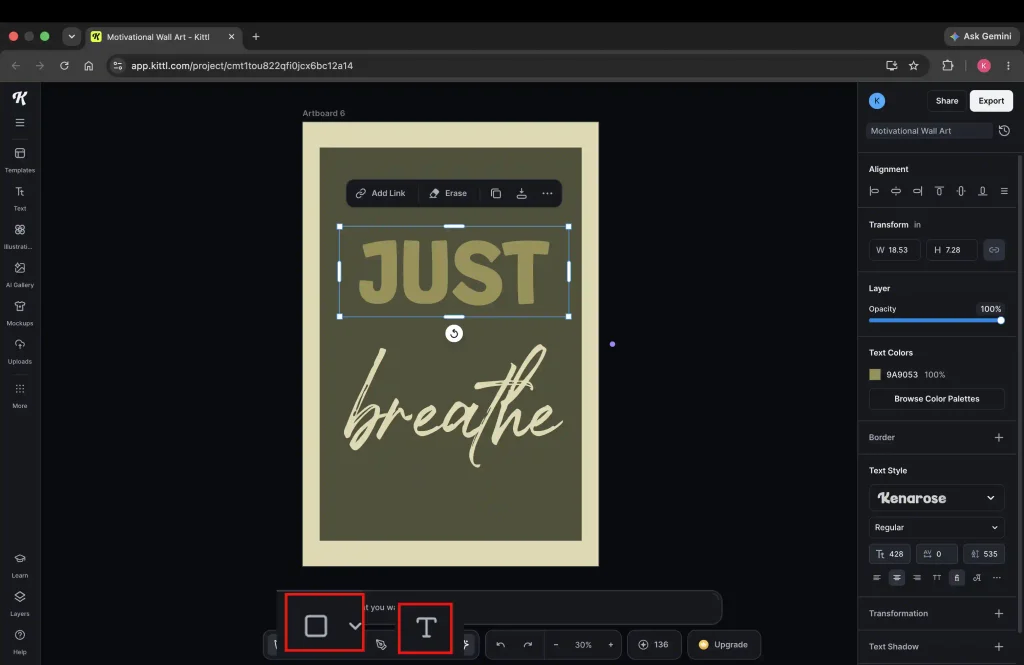
B. Add text using the Type Tool (T) (either from the left panel or bottom toolbar). Select a font from the right panel.
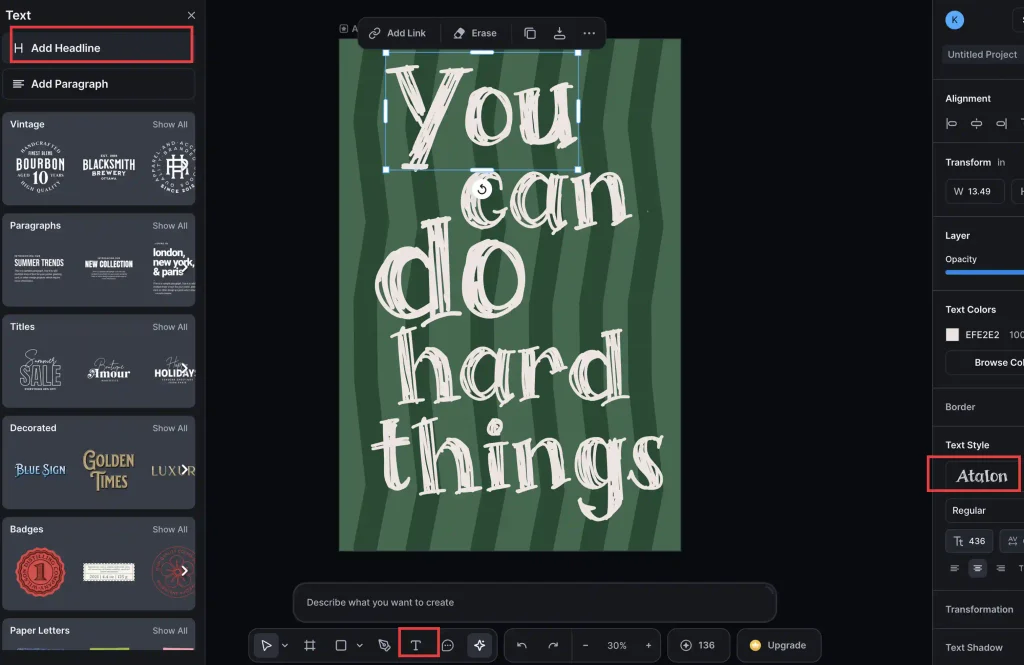
C. Apply a transformation preset, such as Rise, Circle, or Wave, from the right-hand panel to bend your text into a dynamic shape. You can drag individual anchor points to further tweak the letterforms beyond the standard presets.
Design 2 (Checkered background)
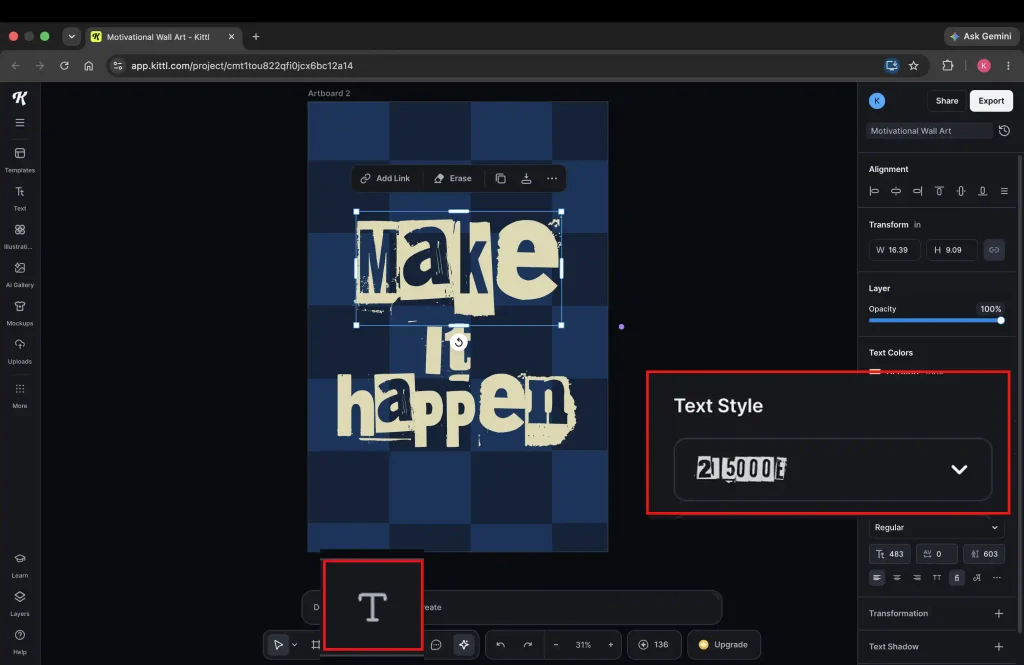
Font name and color: 215000E, Light khaki (#DFD8B0)
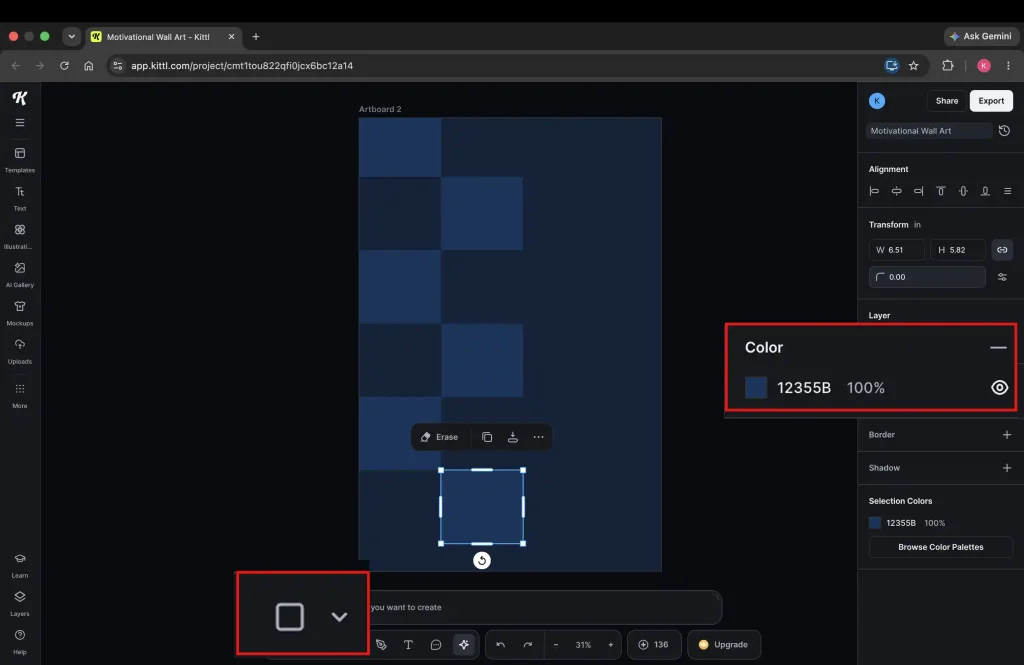
Background color palette: Deep navy (#102238), Steel navy (#12355B)
A. Set your background color. Drop a rectangle and duplicate to make an evenly spaced vertical line. Copy this line to build your checkered background.
B. Drop your quote in a decorative font over the checkered background.
Design 3 (Striped Background)
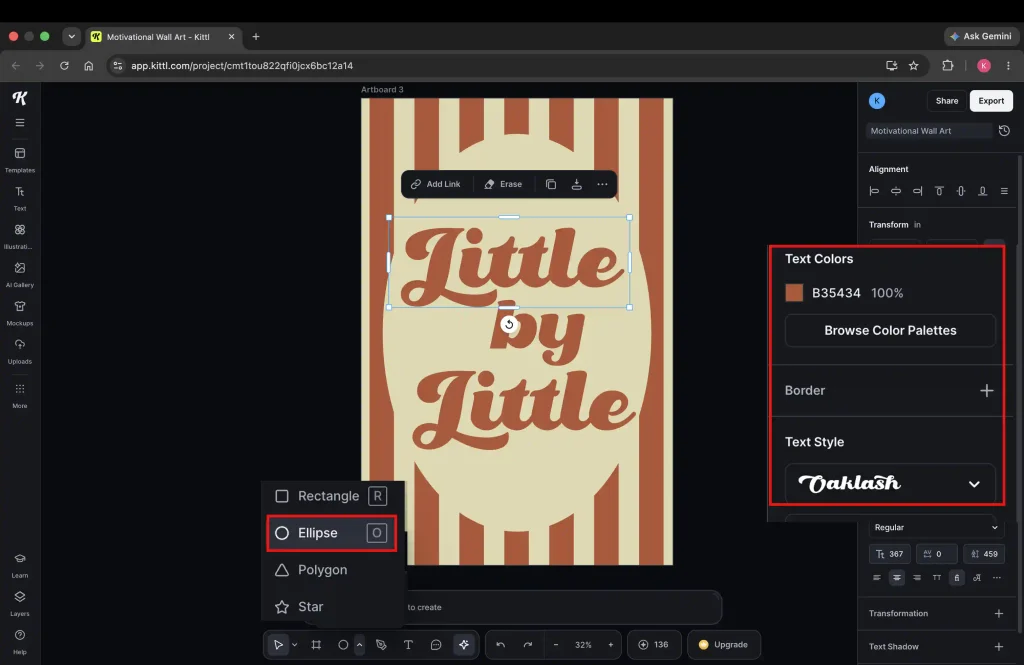
Font name and color: Oaklash, Burnt orange (#B35434)
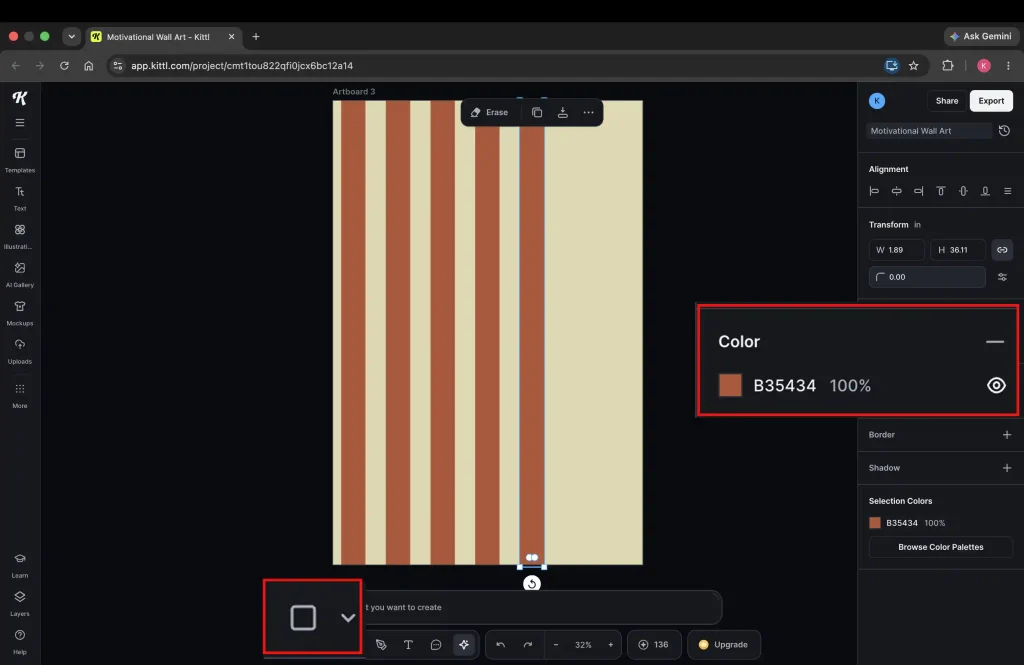
Background color palette: Burnt orange (#B35434), Light khaki (#DFD8B0)
A. Drop in a vertical stripe using the rectangle shape from the bottom toolbar. Duplicate and space evenly until your whole background is covered.
B. Pop an ellipse right out of the bottom toolbar and onto your canvas. Match its color up with your background so it blends right in, then drop your quote right on top.
Design 4 (Uneven stripes background)
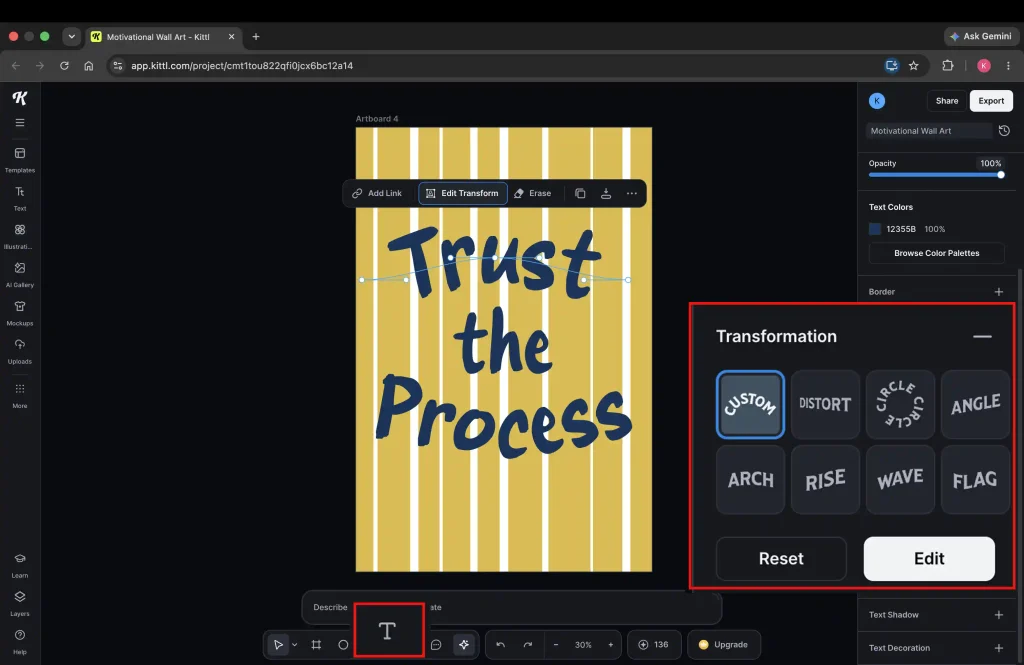
Font name and color: LT Makeup, Steel navy (#12355B)
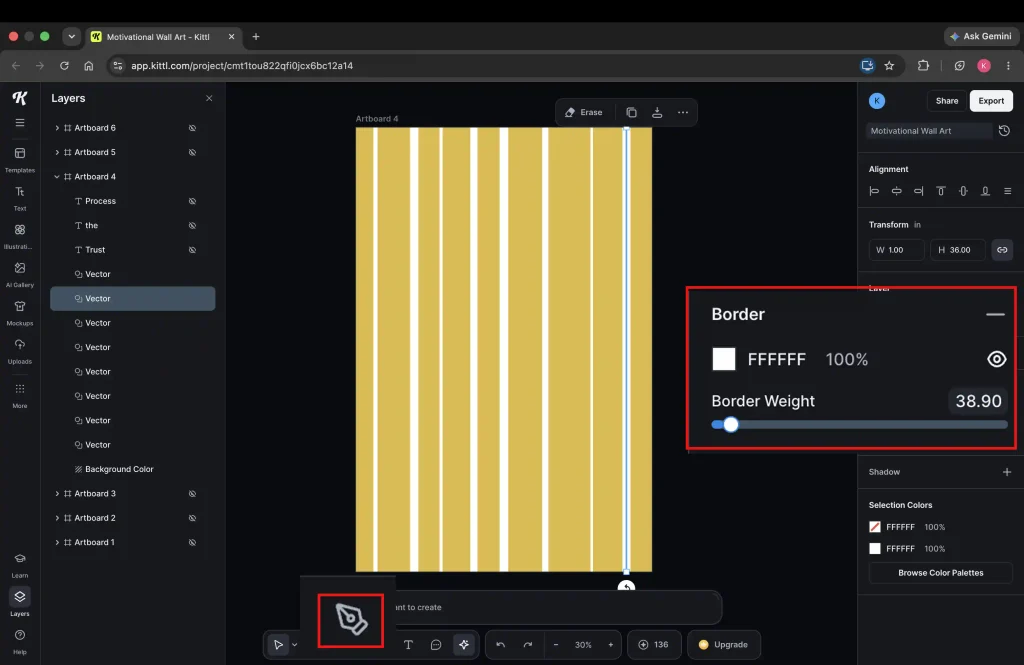
Background color palette: Mustard yellow (#DDBB3F), Pure white (#FFFFFF)
A. Add a line with the pen from the bottom toolbar. Duplicate across the canvas and set different weights for each stripe to give that cool, uneven, hand-drawn look
B. Drop in your quote and switch the font over to whichever one you want to use.
Design 5 (Crisscross background)
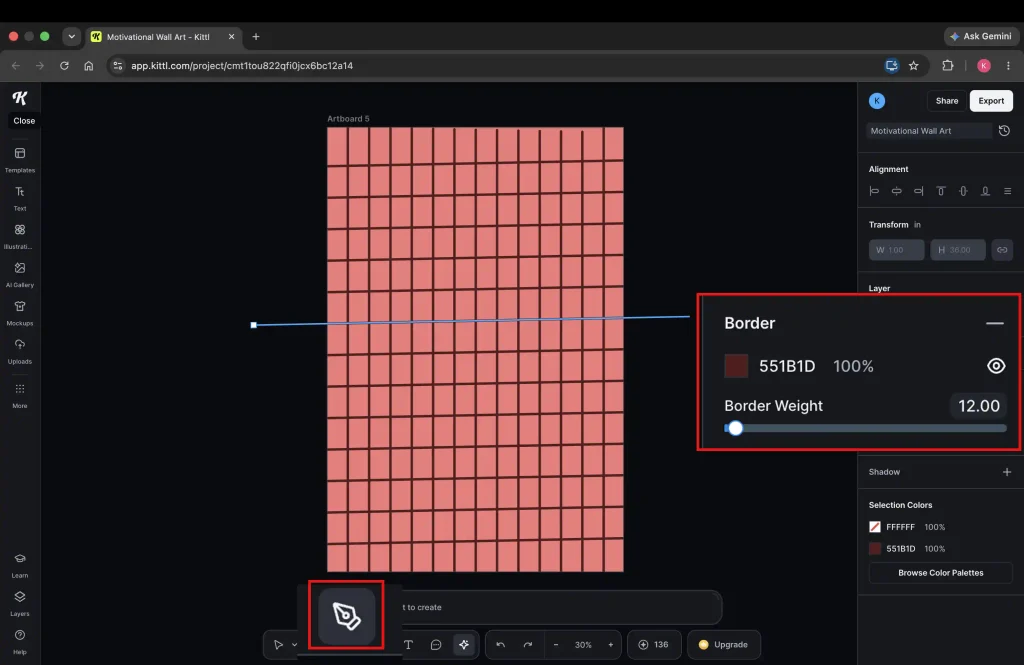
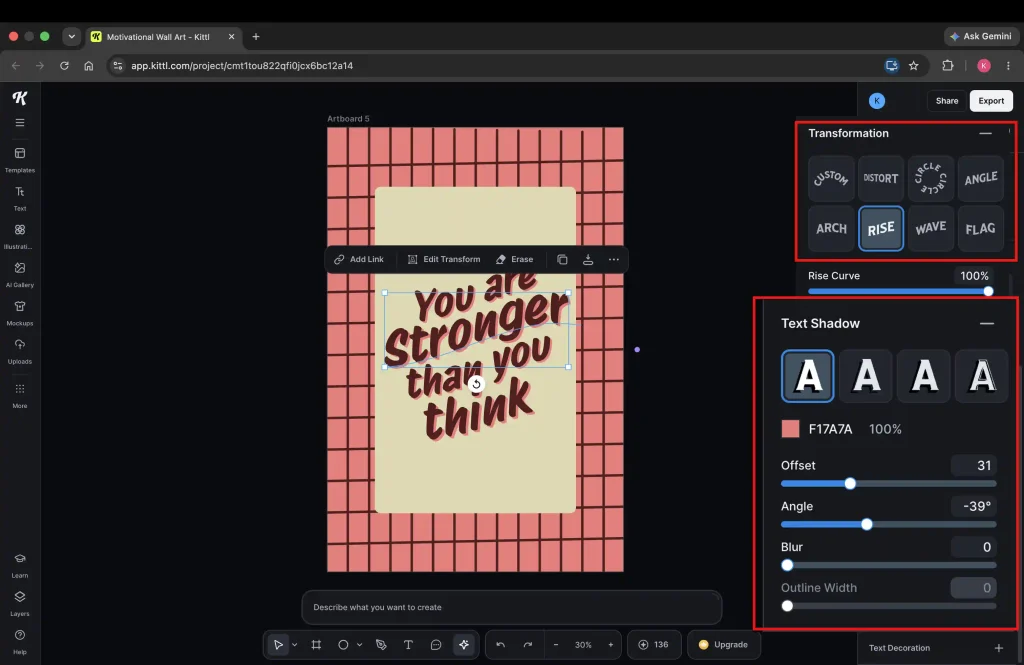
Font name and color: Protest Riot, Main color: Burgundy (#551B1D), Shadow color: Coral red (#F17A7A)
Background color palette: Light khaki (#DFD8B0), Coral red (#F17A7A), Burgundy (#551B1D)
A. Draw a vertical line with the pen tool, duplicate it across the canvas, and space them out evenly. Then, just copy the whole group and rotate them sideways to create a quick crisscross background!
Drop a rectangle, type your text right inside it, apply a ‘rise’ effect, and add a shadow using the text shadow tool. Just slide the blur down to zero to make that outline totally solid.
Design 6 (Border background)
Font name and color: Kenarose, Olive-gold (#9A9053), Robusta, Light khakhi (#DFD8B0)
Background color palette: Light khakhi (#DFD8B0), Olive green (#4E5039)
A. Pick a background color, drop a rectangle, and resize it so you’ve got an even border all the way around the edges. Then, throw in a cool font duo.
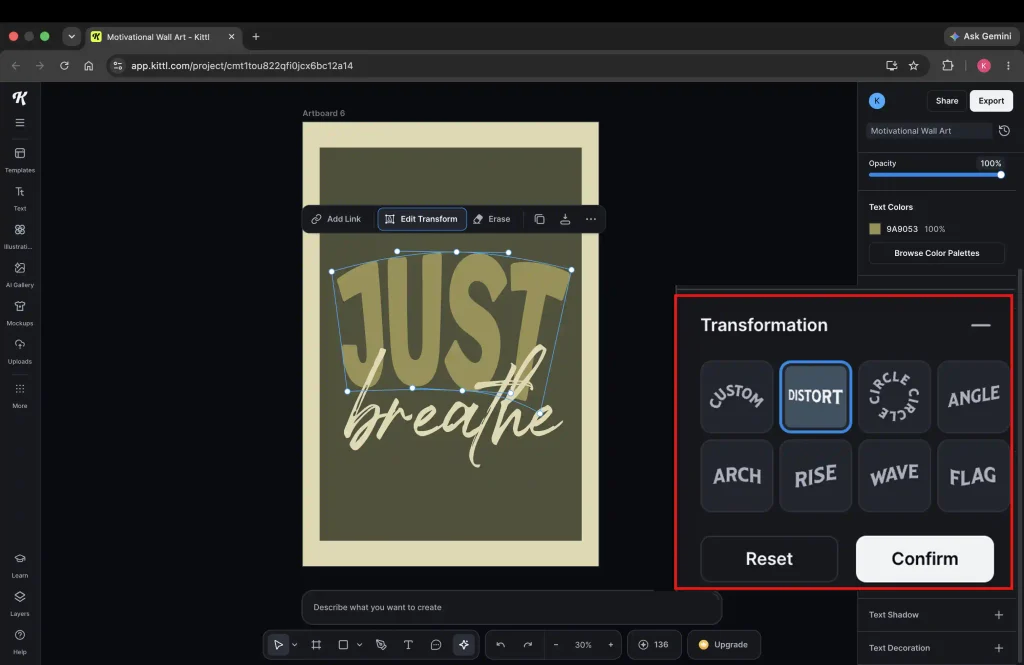
B. Hit Distort in the transformation panel and play with the anchor points to make the first word taller. Then drag and resize both words around until they sit nicely together.
One cool trick: The ultimate time-saver
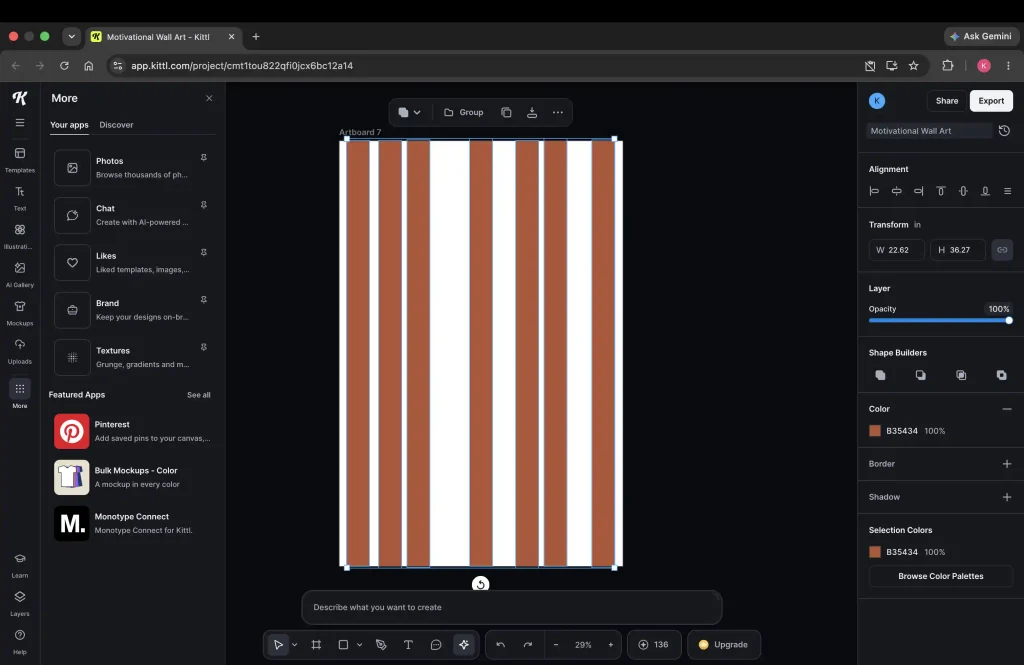
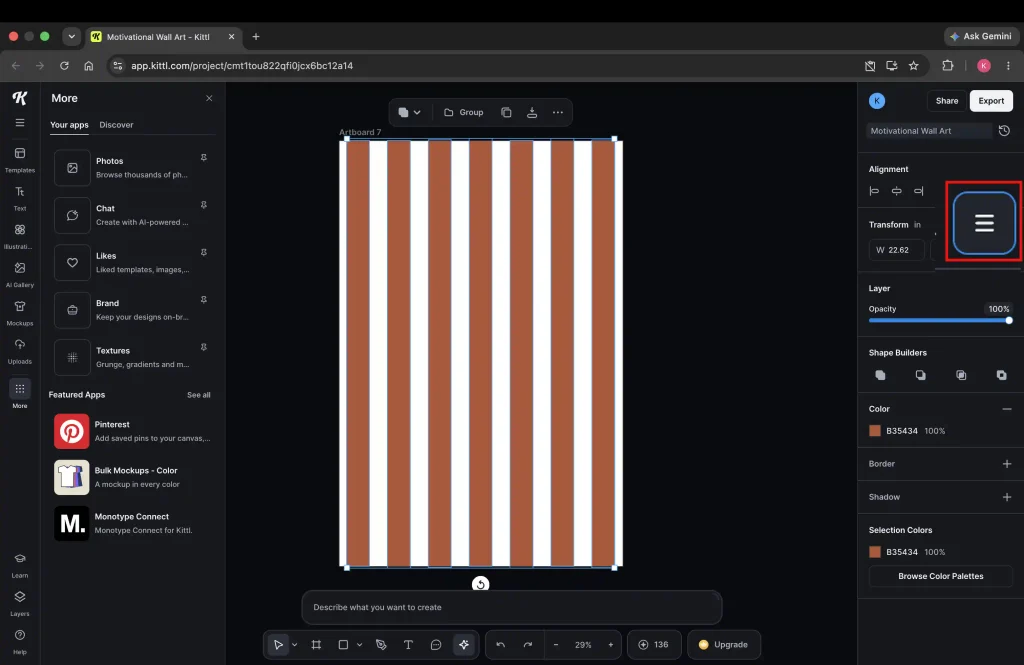
Manually spacing out copied objects can get pretty tedious. Thankfully, Kittl has a built-in Tidy tool that spaces everything out evenly at the click of a button. Don’t forget to use this shortcut to save yourself a ton of time. Check out the screenshots below to see how it’s done:
A. Evenly space out the first and the last object right from the edges.
Hit Tidy in the top-right corner of the panel to space all those objects out evenly in one click.
6. Target different buyers
Because these six quotes appeal to very different mindsets, grouping them by target buyer and space will seriously boost your search rankings, conversion rates, and multi-print bundle sales on Etsy.
| Category | Recommended Phrases | Best Target Spaces & Audiences |
|---|---|---|
| Therapy & Calming Spaces | • “Just breathe” • “You can do hard things” • “You are stronger than you think” • “Little by Little” | Counseling offices, school nurse rooms, therapy waiting areas, calm corners, nursery/kids’ rooms |
| Growth Mindset & Classroom Decor | • “You can do hard things” • “Trust the process” • “Little by Little” | Middle/high school classrooms, study nooks, kids’ bedrooms, college dorms |
| Hustle & Entrepreneur Offices | • “You can do hard things” • “Make it happen” • “Trust the process” | Home offices, gyms, co-working spaces, startup studios |
Pro tip: Stick to quotes that genuinely fit your specific niche. For example, if you’re designing wall art for a therapy office, overly pushy phrases like “make it happen” or “there is always a way” can feel overwhelming for clients. On the flip side, something like “just breathe” feels a bit out of place in a busy classroom, and “little by little” isn’t going to resonate with hustling entrepreneurs.
7. Prepare different sizes and export
You need to offer different sizes for wall art, but the exact dimensions depend entirely on whether you’re selling digital downloads or physical prints. Check out my guide on the most popular wall art sizes to learn the exact dimensions you need.